Match Recognize

Description
Complex event processing (CEP) finds situations that only a sequence of events reveals: three failed logins followed by
a successful one, a price that keeps falling and then jumps, an aircraft that descends towards a runway and climbs
again instead of landing. The Match Recognize node (match-recognize) detects such sequences: you describe the pattern
in a form - the events it consists of, their conditions and what to return - and the node matches it per key, in event
time, emitting one record per match.
Under the hood the node generates and runs a Flink SQL
MATCH_RECOGNIZE
query over the incoming records, and has its semantics. The SQL is not shown or edited; for a pattern the form cannot
express, write the query in the Flink SQL node.
- The input of the node is one record variable available before the node, usually
#input. Its fields become the columns the conditions and measures refer to, under their own names, plusrecord_time- the record's timestamp, which the pattern is ordered by. - The node clears all upstream variables - after the node only the output variable is available, holding one field per measure.
The node is available only in the Streaming processing mode, for unbounded streams.
When to use it
A Filter looks at one event; an aggregate sums up many of them. Neither can say that one kind of event was followed by another - that a login failed three times and then succeeded, that a card was used in two countries within an hour, that a sensor reading kept falling and then jumped, that an aircraft was about to land and climbed away instead. Match Recognize is for that: a situation that only shows in a sequence of events of one key, in order, within a time. Typical uses are fraud and abuse detection (a sequence of operations that no single one gives away), customer journeys (an abandoned basket, a repeated failure before a churn), telecom and IoT alarms (a degradation that continues, a device that reboots in a loop), and operational monitoring like the flight example below.
When the sequence is only two events and the question is "has this key been seen before", the Deduplication node or a Previous Value is simpler. When the question is a count or a sum over a window, use an aggregate.
How a pattern is matched
- The stream is split into independent groups by Partition by - usually the key of the thing being watched: an account, a device, an aircraft. Each group is matched on its own, so a pattern never mixes events of two keys.
- Within a group, events are taken in the order of Order by, which has to be the time attribute
record_timeascending. Flink needs it for deterministic matching; out-of-order events are sorted by the watermark first. - The pattern is a regular expression over events. Each pattern variable (A, B, C, ...) stands for one kind of event, defined by its conditions; a quantifier says how many consecutive events of that kind may follow each other.
- When a sequence matches, the measures compute the values returned for it, e.g. the time of its first event or the altitude of its last one. One record per match is emitted, with the measures as its fields.
- After match decides where the search continues, and Within limits how long a match may take.
Parameters and configuration
| Name | Description |
|---|---|
| Input variable | The record variable the pattern reads, usually #input. Its fields are listed below it. |
| Pattern | The sequence of pattern variables, each with a quantifier and conditions - see Building the pattern and Defining the events. |
| Output | The measures - the fields of the record emitted for every match, see Choosing what to return. At least one is required. |
| Partition by | A field of the input; groups are matched independently. Without it all events go through a single thread, so set it whenever the pattern is about a key. The form takes one field; for a composite key, compute it upstream (e.g. in a Variable) or write the query in the Flink SQL node. |
| Order by | record_time - the order of events within a group, the time attribute, ascending. |
| Within | An amount and SECOND, MINUTE, HOUR or DAY (at most 99 of the unit); optional. The longest time between the first and the last event of a match. Flink drops the state of partial matches older than this. Leave it empty only for patterns that always complete quickly - otherwise the state of keys whose pattern never completes grows without limit. |
| After match | Where matching continues after a match: SKIP PAST LAST ROW (default) - after its last event, so matches never overlap; SKIP TO NEXT ROW - after its first event; SKIP TO FIRST / SKIP TO LAST a variable - at the first / last event of that variable. |
| Output variable | The name of the variable holding the measures of a match. |
Building the pattern
Pattern shows the sequence as a row of colored variables; a new node starts with one, A. Add a variable to extend
the sequence; a new one gets the next free letter. Click a variable to set:
- Variable name - the name used in conditions and measures, a letter by default,
- Description (optional) - what this event means, shown on its card, e.g. "descending",
- the quantifier:
| Quantifier | Matches | SQL |
|---|---|---|
| exactly once | one event | A |
| one or more (+) | one or more events in a row | A+ |
| two or more ({2,}) | at least two events in a row | A{2,} |
| zero or one (?) | an optional event | A? |
| zero or more (*) | any number of events, also none | A* |
| exactly n ({n}) | exactly n events in a row | A{3} |
| between n and m ({n,m}) | from n to m events in a row | A{2,5} |
- greedy or reluctant - a quantifier that allows more than one event is greedy by default: it takes as many events
as it can. Reluctant (
A+?,A{2,}?) takes as few as it can and stops at the first point where the rest of the pattern can complete. Choose reluctant when a greedy variable would swallow the events the next variable needs - e.g.C{2,}followed byD, where every climbing event could be both aCand theD. Reluctant is not available for "exactly once", "zero or one" and "exactly n", which Flink doesn't support in that form.
Defining the events
Each pattern variable has its own card with its conditions; an event belongs to the variable when all of them hold
(they are joined with AND). A variable without conditions matches any event.
-
In simple mode a condition is a field, an operator (
=,!=,<,<=,>,>=,IS NULL,IS NOT NULL) and a value:on_ground = FALSE,vertical_rate < -1.0. Values are SQL literals - strings in single quotes,'PL'. -
Switch a condition to expr for anything else -
OR, arithmetic, or a comparison with another event of the pattern. The expression is SQL; the fields of the variable are suggested asB.baro_altitude. Two functions are what most patterns need:LAST(B.baro_altitude, 1)- the value of the previousBevent, e.g. to require that altitude keeps falling:LAST(B.baro_altitude, 1) IS NULL OR B.baro_altitude < LAST(B.baro_altitude, 1),LAST(C.baro_altitude),FIRST(A.record_time)- the last or first event matched so far by another variable.
A simple condition can be switched to expr and back; the form keeps it when it still fits the simple shape.
Choosing what to return
Output lists the measures - the fields of the record emitted for every match. Edit measures opens a table with one row per measure:
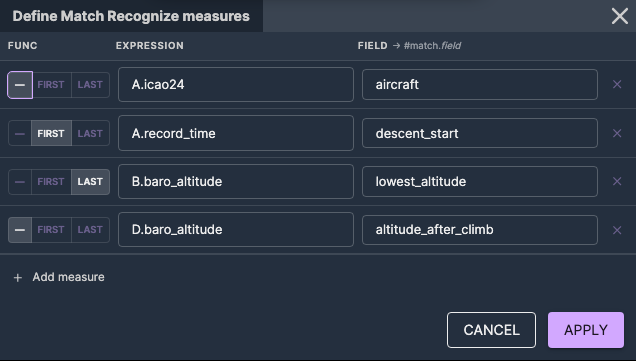
- Var - the pattern variable the value is taken from,
- Func -
FIRSTorLASTfor the first or the last event matched by a variable that matches several events, or none for a variable matched once; an aggregate over them (MAX(B.amount),COUNT(B.amount)) goes into the expression with no function chosen, - Expression - the field or SQL expression, e.g.
A.icao24,B.baro_altitude, - Field - the name of the field in the output record (shown as Alias in the Output list).
The match is emitted in the variable named in Output variable, so a measure with alias lowest_altitude is read
downstream as #match.lowest_altitude (for Output variable match). The variables from before the node are not
available after it: return as a measure everything you need later, e.g. the key of the match.
Validation
The definition is checked when the scenario is validated, also when it is saved through the API or by the assistant: the input variable and the fields are checked against the variables available before the node, the pattern against itself (duplicated variable names, an after-match target that is not in the pattern, a missing measure), and the generated query by the Flink planner. Every error names the part of the form it belongs to, for example:
Condition 2 of step B: #input has no field 'amout'. Did you mean 'amount'?Condition 1 of step A: 'PL' is neither a field of #input nor a quoted text value. Text values need quotes: 'PL'Measure 'last_velocity': step 'C' is not part of the pattern (A, B)
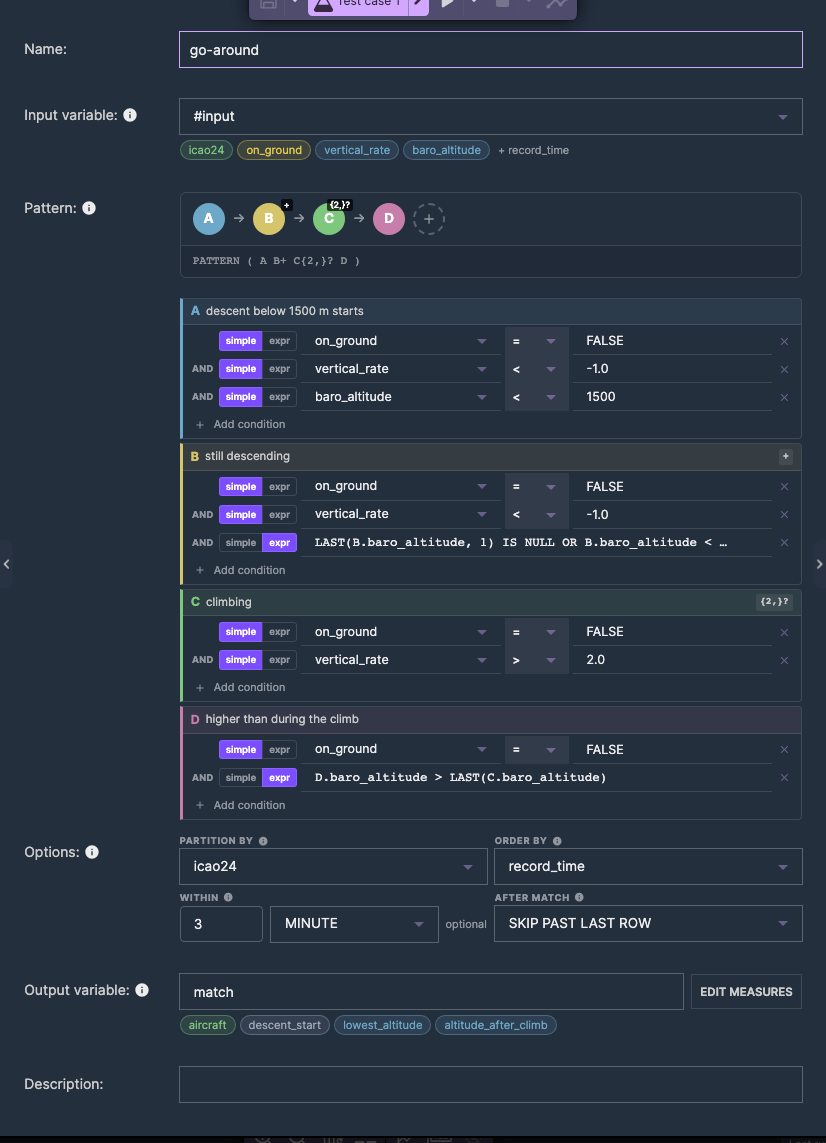
Example: go-around detection
A stream of aircraft positions, #input with the fields icao24 (the aircraft), on_ground, vertical_rate (m/s)
and baro_altitude (m), should report a go-around: an aircraft descending below 1500 m, descending further, and then
climbing again instead of landing.
| Variable | Quantifier | Conditions |
|---|---|---|
| A | exactly once | on_ground = FALSE, vertical_rate < -1.0, baro_altitude < 1500 - the descent below 1500 m starts |
| B | one or more | on_ground = FALSE, vertical_rate < -1.0, expr LAST(B.baro_altitude, 1) IS NULL OR B.baro_altitude < LAST(B.baro_altitude, 1) - still descending |
| C | two or more, reluctant | on_ground = FALSE, vertical_rate > 2.0 - climbing |
| D | exactly once | on_ground = FALSE, expr D.baro_altitude > LAST(C.baro_altitude) - higher than during the climb |
Measures: A.icao24 as aircraft, FIRST(A.record_time) as descent_start, LAST(B.baro_altitude) as
lowest_altitude, D.baro_altitude as altitude_after_climb. Options: Partition by icao24, Order by
record_time, Within 3 MINUTE, After match SKIP PAST LAST ROW.
C is reluctant: greedy C{2,} would also take the event that should be D, and the pattern would never complete.
Downstream, e.g. a Kafka sink, the go-around is #match.aircraft, #match.descent_start, #match.lowest_altitude and
#match.altitude_after_climb. Several patterns over the same stream - landings, go-arounds, rapid descents - are
separate Match Recognize nodes on branches after a Split.
The query the node runs for this definition, for reference:
SELECT *
FROM (
  SELECT
    input.icao24 AS icao24,
    input.on_ground AS on_ground,
    input.vertical_rate AS vertical_rate,
    input.baro_altitude AS baro_altitude,
    record_time
  FROM record
)
MATCH_RECOGNIZE (
    PARTITION BY icao24
    ORDER BY record_time
    MEASURES
        A.icao24 AS aircraft,
        FIRST(A.record_time) AS descent_start,
        LAST(B.baro_altitude) AS lowest_altitude,
        D.baro_altitude AS altitude_after_climb
    ONE ROW PER MATCH
    AFTER MATCH SKIP PAST LAST ROW
    PATTERN (A B+ C{2,}? D) WITHIN INTERVAL '3' MINUTE
    DEFINE
        A AS A.on_ground = FALSE
          AND A.vertical_rate < -1.0
          AND A.baro_altitude < 1500,
        B AS B.on_ground = FALSE
          AND B.vertical_rate < -1.0
          AND (LAST(B.baro_altitude, 1) IS NULL OR B.baro_altitude < LAST(B.baro_altitude, 1)),
        C AS C.on_ground = FALSE
          AND C.vertical_rate > 2.0,
        D AS D.on_ground = FALSE
          AND D.baro_altitude > LAST(C.baro_altitude)
) AS match_result
Testing a pattern
A pattern is easy to get almost right. Test it before deploying, with a test case of events written to match - and not to match - the pattern:
- Give the events of one key increasing timestamps, close enough to fit in Within; events of other keys may be interleaved, since partitions are matched independently.
- Add an assertion on the node, e.g. that one match is emitted for the sequence that should match and none for an almost-matching one.
- The node keeps partial matches in state but doesn't show them. When nothing matches, shorten the pattern to its first variables and add them back one by one to find the condition that fails.
- The node can't be mocked in scenario tests - it has to be fed real records.
After deployment, the counts and the live data of the node show how many matches it emits.
Things to watch
- Always consider Within. Without it, every key whose pattern starts but never completes keeps its state forever.
- Greedy quantifiers followed by a similar event swallow that event - make the earlier one reluctant.
- One record per match. Flink runs
MATCH_RECOGNIZEwithONE ROW PER MATCHonly; to see the matched events themselves, return what you need from them as measures. - Conditions of a card are joined with
AND. ForOR, write the condition as an expr. - Partition by takes one field in the form. For a composite key, compute it upstream or use the Flink SQL node.
- Matching is driven by the watermark. A match is emitted once the watermark passes its last event; late events (behind the watermark) are not matched.
- Changing the pattern changes the state. The node is stateful: partial matches live in Flink state and are restored from a savepoint when the scenario is redeployed; after a changed pattern they may no longer fit it.
Further reading
- Complex event processing with Apache Flink: visual CEP with Nussknacker - the flight example end to end: landings, go-arounds and rapid descents on live aircraft positions, with the reasoning behind each pattern.
- Flink's
MATCH_RECOGNIZEreference, for the semantics of quantifiers, after-match strategies and theFIRST/LASTnavigation.