Decision Table


Description
Some decision trees can't be easily modeled using filter/switch/split nodes or resulting tree can be huge/unreadable. In such cases user may try to use the decision table component. This can be helpful in situations like enriching data using static dictionary or matching business objects to specified segments based on multiple decision parameters.
Our implementation of the decision table is more generic than the one described in Wikipedia.
In our implementation, each column of the decision table contains a "decision parameter" or a resulting "decision".
Nussknacker does not distinguish these two types of columns; however, if you need the functionality of a decision table you probably will include one or more columns with decisions.
To match one or more rows (as in a classic decision table) a match condition returning a boolean value has to be created.
This expression can refer to the variables used in the scenario and values in the columns - hence the name for these columns - "decision parameters".
The result will be a list of matched rows - the rows for which the match condition returned true.
As we do not differentiate the "decision parameter" columns and "decision" columns, the whole matched rows will be returned.
Parameters and configuration
| Name | Description |
|---|---|
| Decision Table | A user-defined tabular data. The user has control over the number of columns and the type of data in a specific column. The values are validated upon input and an empty cell is treated as null. |
| Match Condition | A Boolean SpEL expression based on which one or more rows of the decision table will be selected. To create this expression you can refer to the variables used in the scenario and values in the decision table. Use `#ROW.columnName' notation to access a single cell value. |
| Output | A name of the output variable that will hold a list of matched decision table rows. The rows themselves are records, so the output variable is of type List[Record[...]]. |
Example
We will demonstrate the use of the decision table with a simple business example. Consider a telecom that wants to send offers based on the data of a specific customer.
Suppose that the #input variable contains customer data: "name", "age", "gender" and Boolean field "isBigSpender".
The example decision table is shown below. We use two MinAge and MaxAge columns to define the age intervals
for our customers.
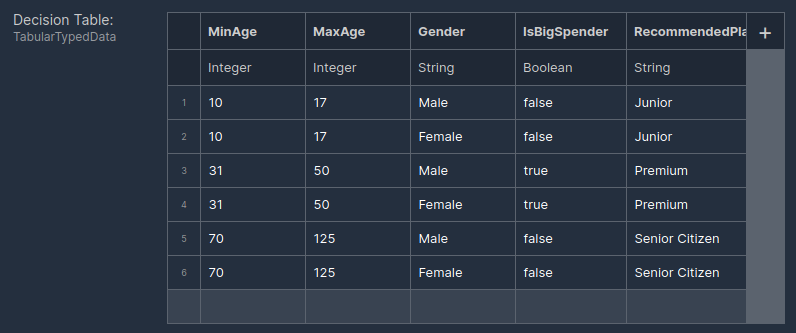
Parameter values used to make decisions and the decisions themselves form a table.
The match condition might look as below:
#input.age > #ROW.MinAge AND
#input.age <= #ROW.MaxAge AND
#input.gender == #ROW.Gender AND
#input.isBigSpender == #ROW.IsBigSpender
The decision's table output variable will contain a list of matched rows.
Assuming the #input is:
{
  "name": "Andrzej Podolski",
  "age": 45,
  "gender": "Male",
  "isBigSpender": true
}
The result of the Decision Table (held in the output variable) will be (JSON notation):
[
  {
    "MinAge": 30,
    "MaxAge": 50,
    "Gender": "Male",
    "IsBigSpender": true,
    "RecommendedPlan": "Premium"
  }
]
Additional considerations
- If you want to get the decision columns only, you need to transform the resulting list in an additional node as shown here.
- It may happen that there will be no matched rows returned. Be ready to handle this situation.
- In many real-world cases, the Decision Table can be simpler (contain fewer rows) if some parameter values are not specified. This is when, for a given row, the decision (the result of the Decision Table) does not need to take a particular parameter into account. Check here for how to test for
nullvalues and how to write expressions resulting inbooleandata type result.