Aggregates in Time Windows

Description
In this documentation, record is a neutral term used across all processing modes.
In purely streaming contexts, we typically use term event - that simply means a record with a timestamp, which lets Nussknacker apply time-based processing logic.
Acting (transforming, aggregating) on events caught into different variants of time windows is the very essence of stream processing. Results of functions applied to all events which fall into the particular time window can bring valuable insights in fraud detection, IoT events analysis, clickstream analysis, etc. A good introduction to aggregating events in streams can be found in this article.
Regardless of the window type used, events are caught into windows based on the event time. Therefore, it is important to understand where Nussknacker takes information about event time from, can event time info be accessed from SpEL and so on - you can find more info here.
Nussknacker implements 3 types of time windows - session, sliding and tumbling windows. Our implementation of the sliding window is different from the way the sliding window is defined in Flink - so watch out for the differences. All the aggregations work on the same principle: events are grouped into time-bounded windows, and a (aggregation) function is applied to each group. The difference between tumbling, sliding, and session windows lies only in how these time boundaries are defined.
Finally, understanding watermarks and problems caused by idle sources will clarify why in certain situations aggregate events or results of joins are not generated. A good description of the problem can be found here.
At the high level, the aggregate-session, aggregate-sliding and aggregate-tumbling components behave similarly:
- they "catch" events into the respective time windows,
- apply some kind of the aggregation function to the events in the window,
- create an aggregation event containing a result of the aggregation function or enrich incoming events with the current value of the aggregate.
The incoming event is enriched with the value of the aggregate by:
- an aggregate-sliding, regardless of the
emitWhenEventLeftconfiguration, - an aggregate-tumbling with
On each eventemit mode, - an aggregate-session in the
On each eventemit mode. Because the events are enriched, the #input variable is available in the nodes downstream.
A new aggregate event is generated by:
- an aggregate-tumbling in the
After window closesemit mode, - an aggregate-session in the
After session endsemit mode. In the above cases the events which entered the aggregation node are 'terminated'. Consequently all the variables defined before the node (including#inputand#inputMeta) will not be available downstream.
Additionally to enriching events entering the aggregation node, new (aggregate) events are generated by an aggregate-sliding in its non-default configuration when parameter emitWhenEventLeft is set to true,
Two additional new variables will always be available 'downstream' of the aggregate node - see common parameters for details:
- a user defined variable containing result of the aggregation
#keyvariable
Parameters and configuration
Common to all window types
Majority of parameters are shared among all the three window types implemented in Nussknacker. Parameters which are unique to a particular window type are described in the section specific to particular window type further down on this page.
Parameters taken by the nodes used to configure aggregates in time windows are easiest explained by the analogy to the SQL statement with a GROUP BY clause and an aggregating function:
SELECT AGGREGATOR_FUNCTION(COLUMN_A)
FROM TABLE T
GROUP BY COLUMN_B, COLUMN_C
The WHERE and HAVING clauses were omitted from the above statement as they have to be implemented separately using the Filter component.
Let’s map the above statement on the parameters of the Aggregate components:
| Name | Description |
|---|---|
| aggregator | This is the AGGREGATOR_FUNCTION from the SQL statement. |
| output | Name of the variable which will hold the result of the aggregator function. |
| groupBy | Equivalent of the GROUP BY in SQL. Events caught into the time window are grouped based on the groupBy value and The aggregator function is applied to each group of events. Whenever an event with the aggregate is emitted, the #key variable will be available containing value of groupBy expression. The result of the groupBy expression must be of type String. |
| aggregateBy | Input to the aggregator function; for each event with the same groupBy value which qualifies to the time window, the aggregateBy expression is evaluated and fed to the aggregator function. |
Available aggregator functions:
- First - returns first value which entered the window
- Last - returns the last value which entered the window
- Min - returns minimal value
- Max - computes maximal value
- Sum - computes sum of values
- List - returns list of inputs received by the aggregator; see aggregateBy to understand what is meant by inputs
- Set - the result is a set of inputs received by the aggregator. Can be very ineffective for large sets, try to use ApproximateSetCardinality in this case
- CountWhen - accepts boolean values, returns how many of them are true
- Average - computes average of values
- StddevPop - computes population standard deviation
- StddevSamp - computes sample standard deviation
- VarPop - computes population variance
- VarSamp - computes sample variance
- Median - computes median
- ApproximateSetCardinality - computes approximate cardinality of a set using HyperLogLog algorithm. Please note that this aggregator treats null as a unique value. If this is undesirable and the set passed to ApproximateSetCardinality aggregator contained null (this can be tested with safe navigation in SpEL), subtract 1 from the obtained result.
Aggregate Session specific
The session window does not have a predefined length. As the name suggests, it is used to compute aggregates for 'sessions' - a set of time related events, which may have or may have not an event signalling an end of a session. In a first case, an event signalling an end of the session is used to close the window. In the latter case, a session ends after the specified amount of inactivity time passes since the last event, for the group of events having the same groupBy value.
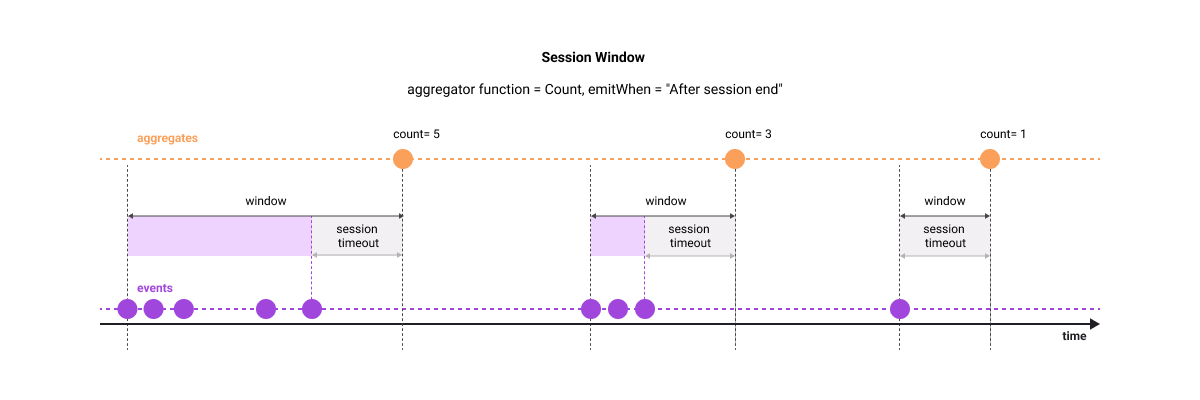
For simplicity, all events share the same groupBy value ("purple")
Parameters specific to the aggregate-session:
| Name | Description |
|---|---|
| endSessionCondition | The Aggregate Session window can close not only on timeout; it will also close when the expression entered in this field evaluates to true. Set this parameter to false if the only way to close the window is through session timeout. |
| sessionTimeout | Aggregate Session window will close after this time since the last event. |
| emitWhen | determines when the event with the result of the aggregation will be emitted. Possible values are:On each event - Window won't be emitted on session end, but after each event. This can be useful when we want to know values of aggregations while session is in progress, but we're not interested in specific event ending the session.After session end - the aggregate event will be emitted only after session window closes. |
Aggregate Sliding specific
The sliding window 'slides' the aggregation window over the events and emits an aggregate whenever a new event arrives ("enters the window"). This is different from the tumbling window, where new window starts regardless of whether event arrived or not.
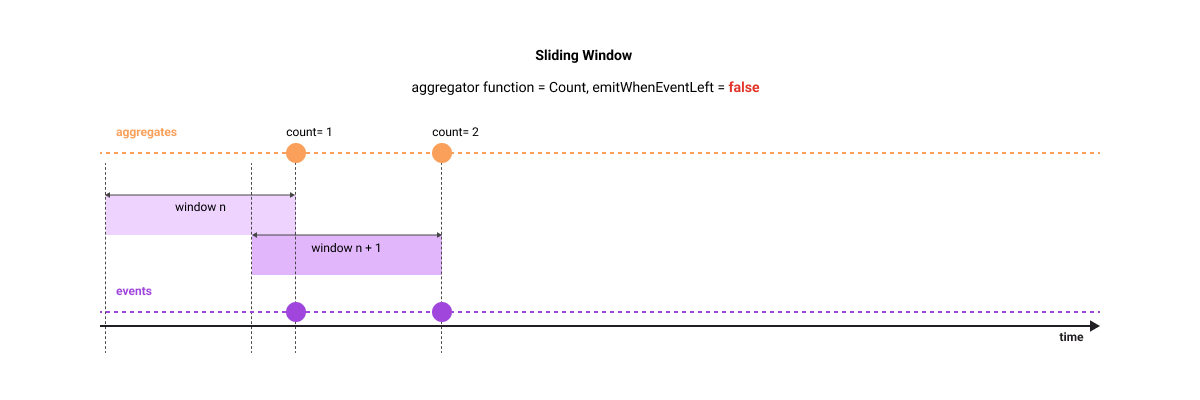
For simplicity, all events share the same groupBy value ("purple")
If you set emitWhenEventLeft window property to true, an additional aggregate event will be generated at the moment when the event which was 'seen' some time ago will no longer be in the currently active window (it left the window in other words). In this configuration, the computed aggregate is an equivalent of a function over a moving window which we commonly apply to time series events - like moving average or moving sum.
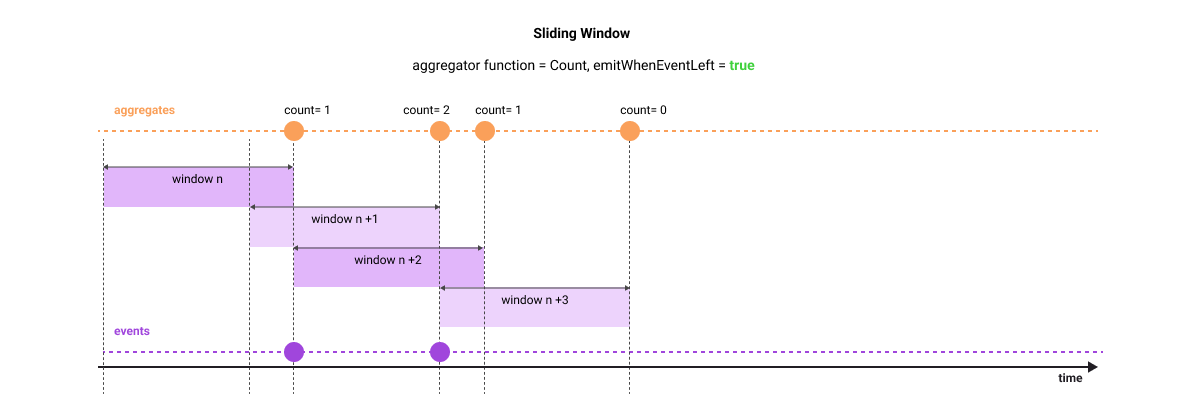
Let's use the following example in case the above explanation is not clear. Imagine that you stand on the flyover over a motorway tasked with counting Porsches in 1 hour sliding window - you are asked to give a separate aggregate for each Porsche color. For simplicity, we will focus only on red Porsches and assume that throughout the whole day only two red Porsches passed our observation point - at 9.25am and at 9.45am. The following table shows aggregates emitted by the sliding-window in each configuration option.
| Time when aggregate is emitted | Count (emitWhenEventLeft is false) | Count (emitWhenEventLeft is true) |
|---|---|---|
| 9.25am | 1 | 1 |
| 9.45am | 2 | 2 |
| 10.25am | N/A | 1 |
| 10.45am | N/A | 0 |
|   |
Aggregate Tumbling specific
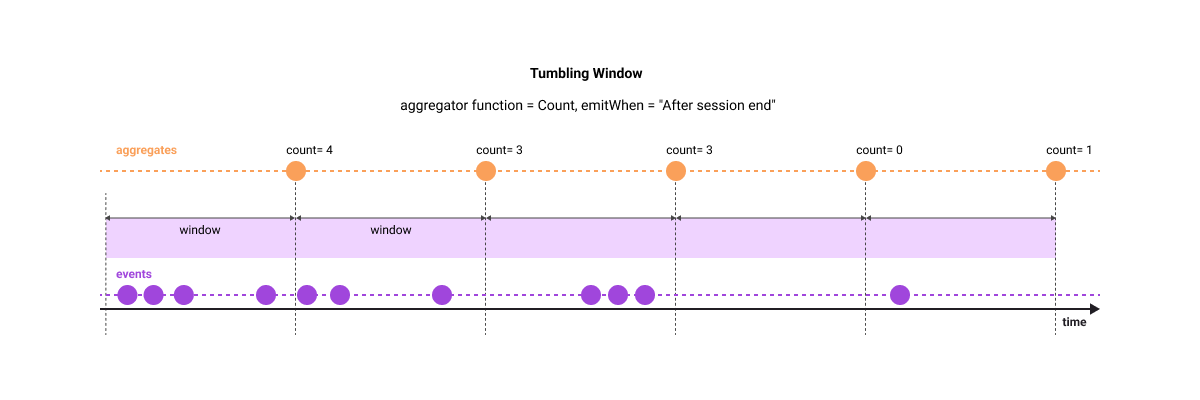
For simplicity, all events share the same groupBy value ("purple")
Parameters specific to the aggregate-tumbling:
| Name | Description |
|---|---|
| windowLength | Length of the tumbling window |
| emitWhen | Determines when the event with the result of the aggregation will be emitted. Possible values are: - On each event - After window closes - After window closes, also when no event for key - we produce extra zero aggregate for each key when no data arrived |
Please bear in mind that late events (according to your watermark strategy) are dropped by this aggregate.
In the example below, a sum of field #input.transfer will be computed in the 7 day window separately for every subscriber (for every distinct value of subscriberId) and an event will be emitted after the 7 day window closes.
Examples
Configuration examples
Let's assume that all the following events emitted by our banking application where caught into the time window:
{"subscriberId":1,"transactionId":11,"operation":"RECHARGE","amount":"500.00"}
{"subscriberId":2,"transactionId":12,"operation":"RECHARGE","amount":"200.00"}
{"subscriberId":1,"transactionId":13,"operation":"TRANSFER","amount":"5000.00"}
{"subscriberId":1,"transactionId":14,"operation":"TRANSFER","amount":"1000.00"}
| groupBy | aggregateBy | aggregator | result* | #key |
|---|---|---|---|---|
#input.subscriberId | #input.value | Sum | 6000.0 200.0 | '1' '2' |
#input.subscriberId | true | CountWhen | 3 1 | '1' '2' |
#input.subscriberId | {“tid”: #input.transactionId, “val”: #input.value} | List | {{“tid”:11, “val”: 500.0},{“tid”:13, “val”: 5000.0},{“tid”:14, “val”: 1000.0}} {{“tid”:12, “val”: 2000.0}} | '1' '2' |
#input.subscriberId +'-'+ #input.operation | #input.value | Max | 500 5000 200 | '1-RECHARGE' '1-TRANSFER' '2-RECHARGE' |
*result is held in the variable configured in the output field.
A bit more complex aggregation example
In all examples above there was only one field which was passed to the aggregator function. What if one needs to pass multiple fields to different aggregator functions? The example below shows the configuration in such a case.
There are two fields destinationBank and amount passed to the respective aggregator functions. Note use of the #AGG function group in the definition of the aggregations. The aggregated values will be available as #totalTransfers.destinationBank and #totalTransfers.amount.
A frequent requirement is to access a field from the groupBy clause downstream the aggregation node. Let's imagine that we need the value of the subscriberId for the emitted aggregate. One could extract subscriberId using the #key variable by applying a set of string manipulation functions. While this is doable even in complex cases (variable string lengths for each of the fields forming the composite groupBy expression) there is an easier way shown below:
The subscriberId will be available in a #totalTransfers.subscriberId variable.
Additional considerations
To reduce resources consumption aggregate nodes and single-side-join precompute aggregates in slices. This video explains the concept of slices; please bear in mind that our implementation is slightly different. The slice length is a compromise between precision and resource requirements; please get in touch with us if you need different slice lengths from the default ones.
There are two implications of using slices:
- The minimal window length used by the components which also use slices should be equal or longer than the slice length. If you configure window length to less than slice length, your aggregate function will not yield correct results.
- If the event with the aggregate is emitted because a new event arrived to the aggregate node and the window length is set to M minutes, the actual window length will be somewhere in the range of (M-1, M] minutes, depending on when exactly the event arrived.
The following slice durations are currently used by Nussknacker. There is no parameter which allows change of the slice length; please get in touch with us if you need to modify it.
| aggregationType | slice length |
|---|---|
| sliding | 60 seconds |
| session | 60 seconds |
| join | 60 seconds |
| tumbling | windowLength |