Processing data with Nussknacker
Introduction
Nussknacker allows authoring decision algorithms - we call them scenarios - abstracting away low-level programming details of Apache Kafka, Apache Flink, Java, etc. The scenarios are authored using prefabricated and reusable processing blocks (components). Components placed in a scenario graph are called nodes; you will use the SpEL expression language to define data transformations performed by nodes and conditions controlling node behavior. Some knowledge of SQL, JSON and familiarity with concepts like variables and data types will help you master data processing with Nussknacker.
Record
A record is the fundamental unit of data that flows through a Nussknacker scenario. It can come from an external source - such as a website click, bank transaction, or sensor reading - or be created inside the scenario, for example as a result of a time window aggregation.
As the record moves through the scenario, it can be extended with additional information. This additional information is stored in variables - named placeholders that are attached to the record during scenario execution. Variables make it possible to retain and reuse intermediate results or derived data later in the scenario.
Depending on the context and the processing mode, the documentation may use processing-mode-neutral term - records, or terms that are processing mode specific: event, request or record.
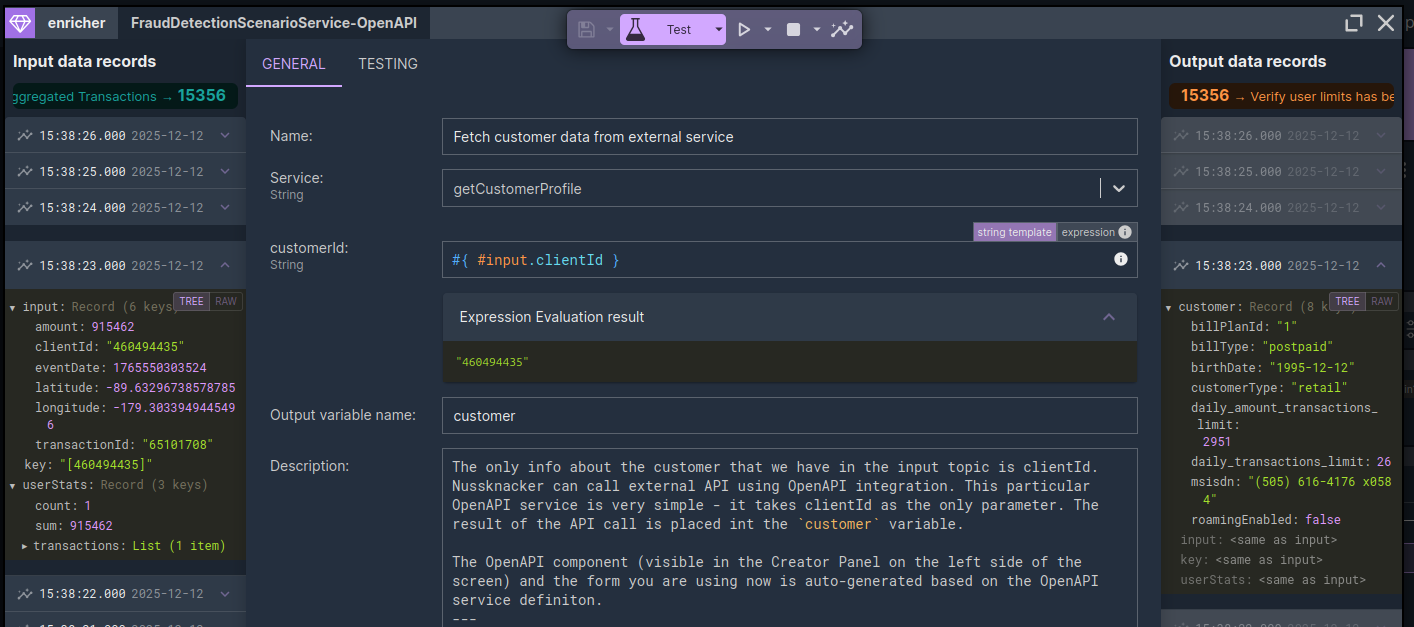
Record content as it enters a scenario node (left panel) and its payload as it leaves the node (right panel). This particular node enriched the record with customer details obtained from the external system
🔍 View full-size image
The example above is from the Real-Time Finance Fraud Detection demo scenario. The link will open an OpenAPI Enricher node of a deployed scenario; you can inspect content of records as they enter and leave scenario. Close the node configuration window to return to the scenario alt="Nussknacker scenario diagram" .
Nussknacker scenario diagram
A Nussknacker scenario is a visual representation of a decision algorithm. Every scenario starts with a data source - often referred to simply as a source. The rest of the scenario forms a sequence of nodes, organized as a Directed Acyclic Graph (DAG), where each node performs a specific operation:
- flow control: filter, switch, and similar components.
- enrichments with data from external sources (JDBC, OpenAPI) or results of ML models
- aggregates in different types of time windows (available with streaming mode)
- custom, tailor-made components, which extend base functionality
- and more
The nodes affect records as they are processed by the scenario. In a typical scenario, you first check if a particular situation (record) is of interest to you (you filter out the ones that aren't). Next, using the data available in the processed record you fetch additional data from the external system(s) - different types of enricher components can be used for this. If you want to explore more than one alternative, you can at any point split the flow into parallel paths. Typically, nodes that terminate the branch of the scenario perform some action - write to a sink or perform an action in the external system. You may also use the Dead-End sink which performs no action other than terminate the processing in the given branch of the scenario.
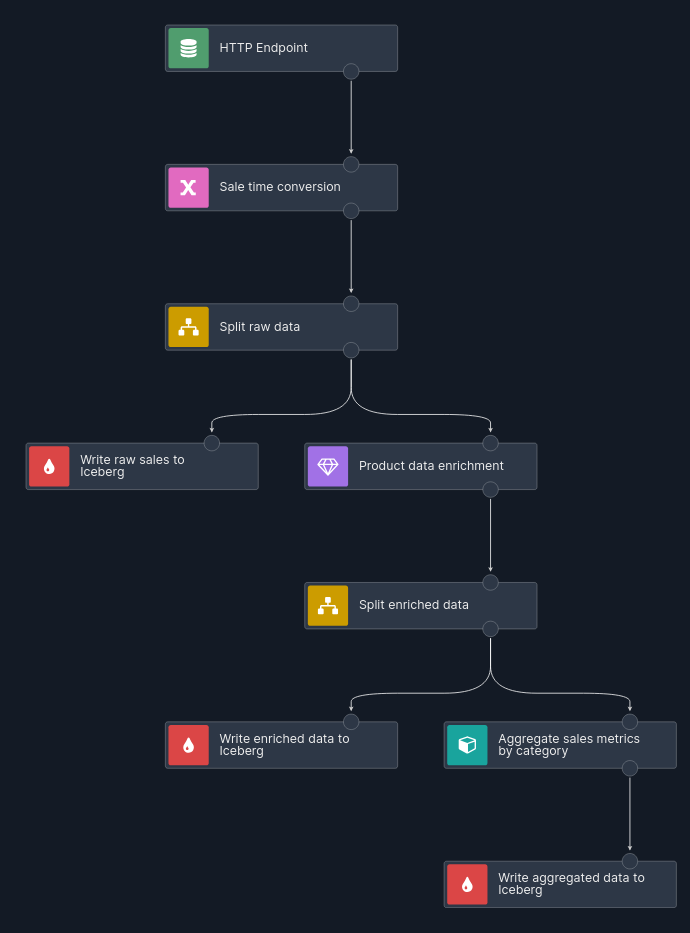
Nussknacker scenario diagram
In the Streaming processing mode the records processed by a scenario are called events. Events can be read from different sources: Kafka topics, Kafka compatible sources, changelog streams via Flink CDC connectors, etc. Events enter the scenario "via" a source node. The nodes process events; once the node finishes processing of an event, passes it to the next node in the processing flow. If there is a split node, the event gets "multiplied" and now two or more events "flow" in parallel through branches of the scenario. There are also other nodes which can "produce" events; for example the for-each node or time aggregates nodes. Finally, some nodes may terminate an event - for example the filter node. The important takeaway here is that a single event that entered a scenario may result in zero, one or many events leaving the scenario.
In the Request-Response processing mode it is a request record which enters a scenario. One of the ways to understand how this request will be processed by Nussknacker's scenario is to think of it as Streaming mode with a singular event. All the considerations from the previous paragraph apply. The most important trait of a Request-Response scenario is that it's synchronous: some other computer system sends a request to Nussknacker and awaits a response. That request is the input to the scenario and the output - the decision - is a response. Since the other system is awaiting a response, there has to be exactly one response. The natural question to ask is what will happen when there are nodes in the scenario which "produce" additional records - for-each or split. The topic of how to handle such situations is covered here.
SpEL
Configuring Nussknacker nodes to a large degree is about using SpEL expressions; knowledge of how to write valid SpEL expressions is an important part of using Nussknacker.
SpEL Spring Expression Language is a powerful expression language that (among others) supports querying and manipulating JSON objects. What exactly does the term expression mean and why is SpEL an expression language? In programming language terminology, an expression is a union of values and functions that are joined to create a new value. SpEL only allows you to write expressions; therefore it is considered an expression language. A couple of examples:
| Expression | Result | Type |
|---|---|---|
| 'Hello World' | "Hello World" | String |
| true | true | Boolean |
| {1,2,3,4 } | a list of integers from 1 to 4 | List[Integer] |
| {john:300, alex:400} | a record (name-value collection) | Record{alex: Integer(400), john: Integer(300)} |
| 2 > 1 | true | Boolean |
| 2 > 1 ? 'a' : 'b' | "a" | String |
| 42 + 2 | 44 | Integer |
| 'AA' + 'BB' | "AABB" | String |
Examples of how SpEL is used in Nussknacker:
- create boolean expressions based on logical or relational (equal, greater than, etc) operators, to control behavior of the node at runtime
- access, query and manipulate fields of a record
- format records written to sinks
- enable use of functions like getting current date and time
- and many more.
The SpEL Cheat Sheet page provides an exhaustive list of examples on how to write expressions with SpEL.
Together variables, SpEL and functions make scenario nodes infinitely flexible - any boolean condition and data transformation can be formulated.
Data Types
Every SpEL expression returns a value of one of the predefined SpEL data types, like integer, double, boolean, record, etc. Data types in Nussknacker can be a confusing aspect at the beginning, as depending on the context in which data is processed or displayed, different data type schemes will be used - please refer to the SpEL Cheat Sheet page for more information.
In some contexts data type conversions may be necessary - conversion functions are described here.
Variables
Nussknacker uses variables as placeholders for data within a scenario. They allow you to store intermediate or derived values and reuse them later in the scenario. This helps reduce redundancy (e.g., avoiding repeated computations) and improves traceability, especially in complex data transformations. You can watch variables values using testing and debugging Nussknacker functionality.
Variables have to be declared; a variable or record-variable component is used for this. Once declared, a hash sign "#" is used to refer to a variable from a SpEL expression. Variables are attributes of a record, they do not exist by themselves.
Predefined variables.
There are three predefined variables: #input, #meta and #inputMeta.
In Streaming processing mode the #input variable is associated with an event that has been read from a Kafka topic. In the Request-Response processing mode the #input variable carries the request data of a REST call which invoked Nussknacker scenario.
The #meta variable carries meta information about the scenario under execution. This variables' contents can change during scenario execution as it's a dynamically allocated variable. The following meta information elements are available:
- processName - name of the Nussknacker scenario
- properties
The #inputMeta predefined variable is specific to streaming processing mode only; check here for more information.
Variables and SpEL in action
Filter node - filtering condition example
The example below is from the Real-Time Finance Fraud Detection demo scenario. The link will open a Filter node of a deployed scenario; you can inspect the content of records as they enter and leave scenario. Close the node configuration window to return to the scenario diagram.
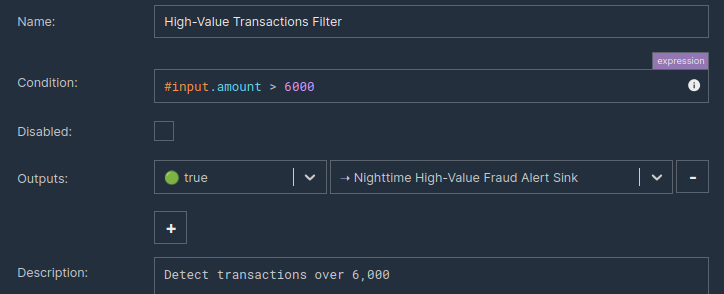
Filtering condition in the Filter node
Filter node decides whether a record is blocked or allowed to pass to the downstream node. In the example above only records with field amount greater than 6000 are allowed to pass downstream.
Data transformation example
The example below is from the Real-Time Finance Fraud Detection demo scenario. The link will open a Variable node of a deployed scenario; you can inspect content of records as they enter and leave scenario. Close the node configuration window to return to the scenario diagram.
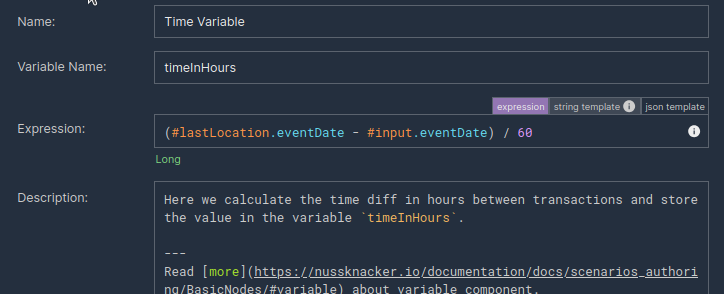
SpEL expression computing time difference in hours
Check here for more information about the Variable component.
Complex decision logic with Decision Table
The example below is from the Streaming SQL vs Nussknacker algorithm graph demo scenario. The link will open a Decision Table node of a deployed scenario; you can inspect content of records as they enter and leave scenario. Close the node configuration window to return to the scenario diagram.
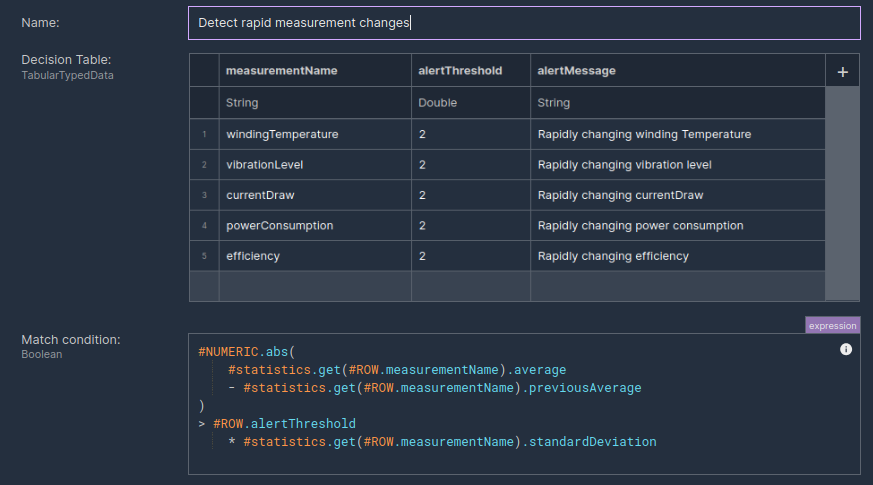
Match conditions of the Decision Table formulated as SpEL expression
The expression manipulates #statistics variable defined in this node:
- accesses
#statisticsfields in the dynamic way, using measurementNames obtained from the Decision Table, - computes measurement change between readouts,
- matches the measurement change against the alertThreshold.
Check here for more information about the Decision Table component.
Ways of providing parameter values
Originally, the only way to provide parameter values, manipulate data and control how scenario nodes behave in Nussknacker was to write "pure" SpEL expressions. In some cases this is not the most convenient or natural way. For this reason we added two additional ways to express parameter values: string templates and JSON templates.
In Nussknacker, parameter values are always provided as expressions and evaluated at runtime, regardless of the expression type used. As a result, you can write now "SpEL expressions", "JSON template expressions" and "string template expressions". For brevity, all these methods will be called expressions - be careful not to narrow the term "expression" to "SpEL expression".
String template
String-template-based input allows text with embedded SpEL expressions. In particular, string templates make it much easier to concatenate strings containing references to variables.
String template is a default expression input method when a value of string data type is expected.
Characteristics:
- Strings are not quoted. If you include quotation mark, it will be treated as part of the string.
- You can use regular SpEL between the curly braces
#{}, the typical use case is to refer to variables.
Examples
Let's assume that the value of #input.name is "John".
| Input | Result | Comments |
|---|---|---|
Hello #{ #input.name } - have a nice day! | "Hello John - have a nice day!" | Note that quote marks (") are not part of the text. |
Length is #{ #input.name.length } | "Length is 4" | Note that integer value produced by the length method was implicitly converted to string. |
JSON template
JSON-template-based input allows use of regular JSON with embedded SpEL expressions. You can use regular SpEL between the curly braces #{}; the typical use case is to refer to variables.
Situations where JSON-template-based input can be more convenient:
- Handling lists - SpEL uses curly braces for lists; this can be confusing and / or inconvenient.
- There is a need for string concatenations when the record is defined.
SpEL expression
Writing SpEL expressions is the original method of providing parameters, transforming data, etc.
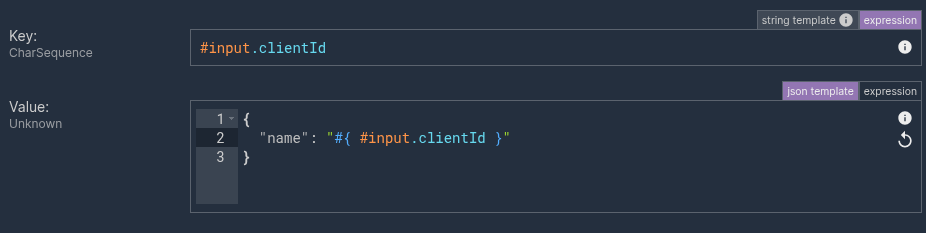
As of now, when you switch between expression types (SpEL, JSON template, string template), there is no attempt to convert the entered text to the target expression type. For example in the case of SpEL expression string "John" will be treated as having length 4. When you switch to the string template expression, the entered text will remain unchanged and it will be treated as a string of length 6. The quotes will be treated as regular characters; not a string "boundary".