Lite Operation Guide
Prerequisites
Integration with Apache Kafka
Lite engine in Streaming processing mode uses kafka-clients to read from and write to Kafka. In most cases the default configuration options apply. The most important of them are:
partition.assignment.strategy-[RangeAssignor, CooperativeStickyAssignor]
However, a few are set differently:
enable.auto.commit-falseisolation.level-READ_COMMITTED
If you want to read events from output topics in transactional manner your Kafka client needs to set isolation.level
to READ_COMMITED, by default Kafka sets READ_UNCOMMITED option - more details
in Kafka documentation.
Nussknacker and K8s cluster
Runtime container
Nussknacker scenario is deployed as a K8s deployment. By default, it creates nussknacker-lite-runtime-app runtime container with scenario's JSON representation passed as config map. Runtime container executes an infinite loop responsible for polling events from Kafka topic.
Startup probes
Nussknacker configures HTTP readiness and liveness healtcheck probes for runtime container.
Readiness probe is used at first and has and impact for container being treated as ready. It's configuration should include e.g how many partition Kafka topic has, what kind of metric provider is used By default, is checks if container is ready every second for 60 times.
| Probe | Type | Default value |
|---|---|---|
| readinessProbe | periodSeconds | 1s |
| readinessProbe | failureThreshold | 60 times |
| livenessProbe | periodSeconds | 3s |
| livenessProbe | failureThreshold | 10 times |
Parallelism
Tuning parallelism one can impact how many independent consumers are reading from Kafka topic.
It's worth noticing that in general number of replicas count should not exceed number of Kafka partitions because in such a case exceeding replica will stay idle due to Kafka assignment strategies.
Deployment strategy
Streaming
Nu uses Recreate deployment strategy together with READ_COMMITED isolation.level property to ensure transactional
manner of processing events and to avoid
situation in which different deployments both reads events from the same topic.
Request-Response
For this processing mode we use RollingUpdate deployment strategy to ensure HA.
Support for interaction (pause/resume) nodes differs by engine:
-
Embedded engine - fully supported. Draining (keeping a redeployed or cancelled scenario version's
/resumeendpoint alive so already-paused continuations can still complete, bounded byrequest-response.continuationTtl) is implemented and works regardless of replica count (the embedded engine is always single-instance). -
Kubernetes - no draining, and resume is reliable only with a single replica. There is no equivalent of the embedded engine's draining window on k8s:
- Cancelling a scenario tears down its Deployment/Service immediately, with no grace period for in-flight
continuations - any
/resumecall after that fails once the pods terminate. - Redeploying relies on plain Kubernetes rolling-update behavior instead: the old pod keeps serving until it
receives SIGTERM after
terminationGracePeriodSeconds, with noPreStophook to wait for pending resumes - a continuation not resumed within that window is lost regardless ofcontinuationTtl. - Separately, the paused-continuation store is per-pod and in-memory, and the k8s
Servicehas no session affinity, so with more than one replica/resumecalls routed to a different pod than the one that issued thecontinuationIdfail unpredictably - deploy scenarios usinginteractionnodes with a fixed replica count of1(e.g. viaFixedReplicasCountK8sScalingOptionsDeterminer).
Treat
/resumeon k8s as best-effort around deploys and cancels until graceful draining is implemented there. See the MigrationGuide for details. - Cancelling a scenario tears down its Deployment/Service immediately, with no grace period for in-flight
continuations - any
On an environment where the above caveats are not acceptable, hide the component instead of relying on scenario authors to avoid it - disable it in the model configuration of that environment:
  componentsUiConfig {
    interaction {
      disabled: true
    }
  }
A disabled component is not offered in the designer and cannot be added to new scenarios.
Paused continuations are kept in a bounded in-memory cache (request-response.continuationTtl,
request-response.continuationMaxCacheSize). When the cache is full, the oldest paused execution is dropped
and can no longer be resumed - the runtime logs a WARN naming the scenario, the interaction node and the
continuationId it dropped, and a later /resume call for that continuationId gets a 400 explaining that
it is unknown, already resumed, expired, or was dropped because the cache was full (the runtime cannot tell
which after the fact). Repeated warnings mean continuationMaxCacheSize is too low for the interaction rate,
or continuationTtl keeps continuations around longer than they are actually resumed.
Failure recovery
In case of an unexpected errors e.g. network issue between Kafka cluster and runtime Nussknacker will try to reconnect
after waitAfterFailureDelay
Other
Other values different to K8s defaults
minReadySeconds- 10 - specifies the minimum number of seconds for which a newly created Pod should be ready without any of its containers crashing, for it to be considered availableprogressDeadlineSeconds- 600 - specifies the number of seconds you want to wait for your Deployment to progress before the system reports back that the Deployment has failed progressing
Scenarios - monitoring and troubleshooting
Each scenario has its own performance characteristics and considerations. This section describes common ways to monitor the health of a running scenario and how to handle common problems. Most of the sections are aimed not only at operations people but also at (especially advanced) editors of Nussknacker scenarios.
Metrics
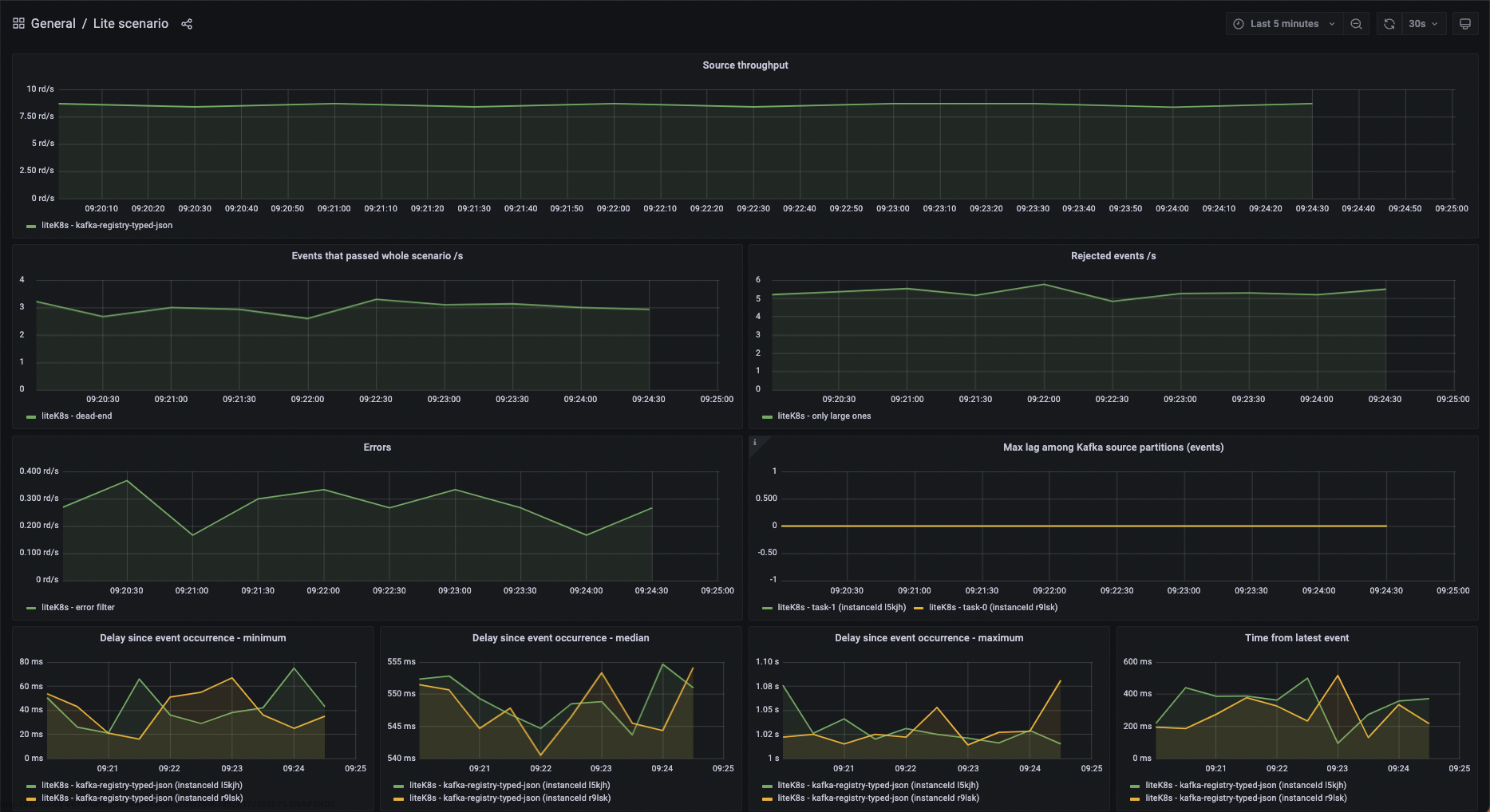
Each K8s pod representing runtime container is visible in metrics tab as separate instanceId.
Logging level
Runtime container logging level can be specified by setting env variable
NUSSKNACKER_LOG_LEVEL- logging level of console STDOUT appender
If you need more fine-grained control over logging in specific scenario deployment you can modify logback.xml config
file which is being used by it, by overriding config map linked to your runtime container under logback.xml key.
Please be aware, that modifications made to this config map are transient - every (re)deploy of scenario, creates config
map from scratch with default (or configured in DeploymentManager -
see docs ) content.
Managing lifecycle of scenario
State of the scenario can be viewed in the scenario list, in the scenario details view or via API. Possible states can be grouped in the following categories:
- Not running
- NotDeployed (initial status before first deploy)
- Canceled
- Running without problems
- Running - all replicas passed readiness probe and Kafka clients connected to partitions
- Restarting - (after an unexpected exception)
- Temporary states
- DuringDeploy - some replicas not spawned or still connecting to Kafka partitions
- Problem
- Failed - the scenario ended with an error
- Unknown should not happen, check the logs and consult Nussknacker team